



Join The Toyota Alphard & Vellfire Club
Our community has been built by enthusiasts, for enthusiasts, and proudly run by Alphard owners' for over 7 years. As an independent, non-official club, everything you’ll find here, advice, support, and opinions, comes directly from members with genuine Alphard & Vellfire ownership experience. By being a member you can gain access to active community forums, videos, news, events and more...
Most Viewed Club Topics
-
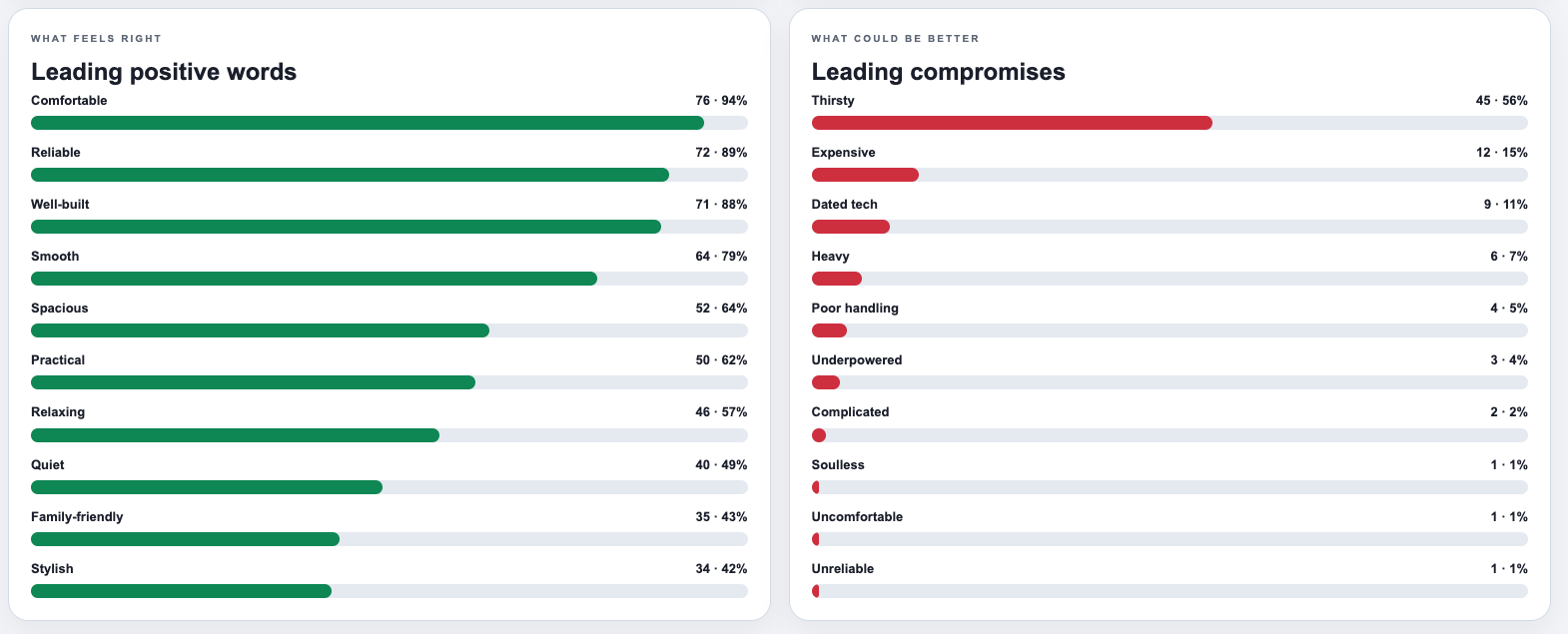
How people are feeling about the alphard in a nutshell. Keep em coming.. we always knew Thirsty was going to be Top Negative lol
-
I thought I'd make a specific thread for this issue, as I couldn't find one anywhere. I provide the solution too! This thread is referring specifically to the cluster of 4 window open/close buttons located in the driver's door. Having owned the Alphard for a couple of weeks I noticed that the button for the driver's door window works, but the buttons for the other three windows don't work. However, all three passenger windows work fine when you use the buttons on each specific door. In anoth
-
My 2006 Alphard is due MOT. Any advice as to the best centres for servicing and MOT in or around Colchester please.
-
-
-
Hi All, I've been playing with some REA tools lately, anyone had any luck at reverse engineering the Toyota Radio to give it's output and coding?





Latest Alphard / Vellfire posts
-
How people are feeling about the alphard in a nutshell. Keep em coming.. we always knew Thirsty was going to be Top Negative lol
-
Update already!... Now that I've reset the three passenger windows, holding the open or the close buttons on the fob for 2 seconds causes all the windows to open/close. Previously it was only the driver's window that responded. Excellent!
-
-
I thought I'd make a specific thread for this issue, as I couldn't find one anywhere. I provide the solution too! This thread is referring specifically to the cluster of 4 window open/close buttons located in the driver's door. Having owned the Alphard for a couple of weeks I noticed that the button for the driver's door window works, but the buttons for the other three windows don't work. However, all three passenger windows work fine when you use the buttons on each specific door. In another thread (rear window de-mister) someone posted about the reset procedure for the windows (window down & hold button for 10 sec, then window up & hold button for 10 sec, then repeat the process just to be sure). I tried it and HEY PRESTO all 4 buttons on the driver's console work again! SOLUTION So, if you have this issue, try the reset procedure for each window, one by one, using the buttons in each individual door, as described above, and you may have success. I certainly did. Apologies if this topic already exists elsewhere - I haven't been able to find it.
Images


Important Information
We have placed cookies on your device to help make this website better. You can adjust your cookie settings, otherwise we'll assume you're okay to continue.